
Optimizing Performance: SQL Server vs Databricks
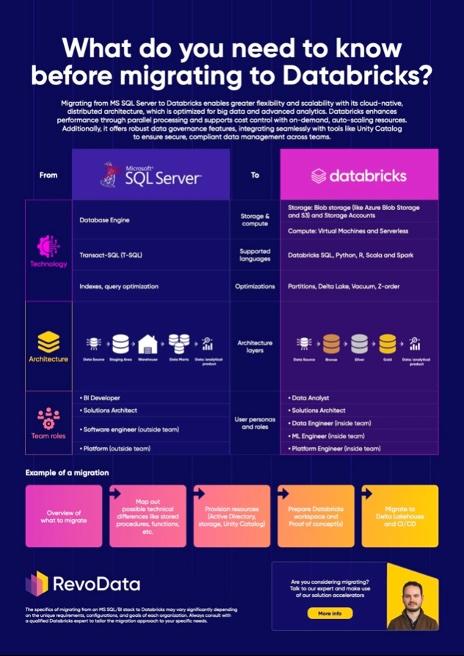
Optimization in a Databricks’s Data Lakehouse differs significantly from traditional SQL Server environments due to its architecture and the nature of data storage. While SQL Server relies on indexing, row-based storage, and dedicated disk structures, Databricks leverages distributed storage, columnar formats, and advanced clustering techniques to enhance performance.
Storage Differences: SQL Server vs. Databricks
SQL Server primarily operates with row-oriented storage, which is optimized for transactional workloads where entire records are frequently accessed. It uses indexes to speed up queries by pre-sorting and structuring data efficiently within a disk-based system. On the other hand, Databricks and other modern Lakehouse platforms use columnar storage formats like Parquet, which enable efficient compression and retrieval for analytical workloads. Instead of fixed disk storage, data in Databricks is often stored in cloud-based solutions such as Azure Blob Storage or AWS S3, leveraging distributed file systems to improve scalability and performance.
Indexing in SQL Server vs. Partitioning in Databricks
In SQL Server, indexing is one of the primary ways to optimize queries, allowing fast lookups within structured tables. However, in Databricks, indexing works differently due to the distributed nature of storage. Instead of relying on indexes, Databricks employs partitioning, which segments large datasets into smaller, manageable chunks based on logical keys like date ranges or categories. While SQL Server indexing is crucial for reducing scan times on relational tables, partitioning in Databricks minimizes the amount of data read, significantly improving query performance.
Advanced Optimizations: Z-Ordering, Liquid Clustering, and Vacuum
Beyond partitioning, Databricks offers additional optimization techniques such as Z-Ordering and Liquid Clustering. Z-Ordering helps co-locate related data within files, reducing the amount of data scanned during queries and enhancing performance for range-based filtering. Liquid Clustering further refines this process by dynamically managing data clustering over time, adjusting to changing query patterns without manual intervention.
Another critical aspect of performance tuning in Databricks is Vacuuming. Unlike SQL Server, where deleted data is managed through transaction logs and page reorganizations, Databricks maintains historical file versions that can accumulate over time. Running Vacuum operations purges obsolete data, ensuring storage efficiency and preventing performance degradation.
Making the Most of Lakehouse Optimization
Optimizing your Data Lakehouse isn’t just about applying best practices—it’s about continuously refining your approach based on your data and workloads. Whether you’re transitioning from SQL Server or looking to enhance your Databricks performance, now is the time to take action.
Are you ready to implement these optimization techniques in your own environment? Start by analyzing your query patterns, revisiting your partitioning strategy, or experimenting with Z-Ordering and Liquid Clustering. If you’re facing challenges, let’s talk! Reach out, share your experiences, and let’s navigate the path to high-performance data together.

Rafal Frydrych
Senior Consultant at RevoData, sharing with you his knowledge in the opinionated series: Migrating from MSBI to Databricks.